API Keys and Connect
API Keys and Connect («API Keys و اتصال») has everything your app needs to connect to the Project in one place: keys, addresses, code samples per language and the direct Database connection details.
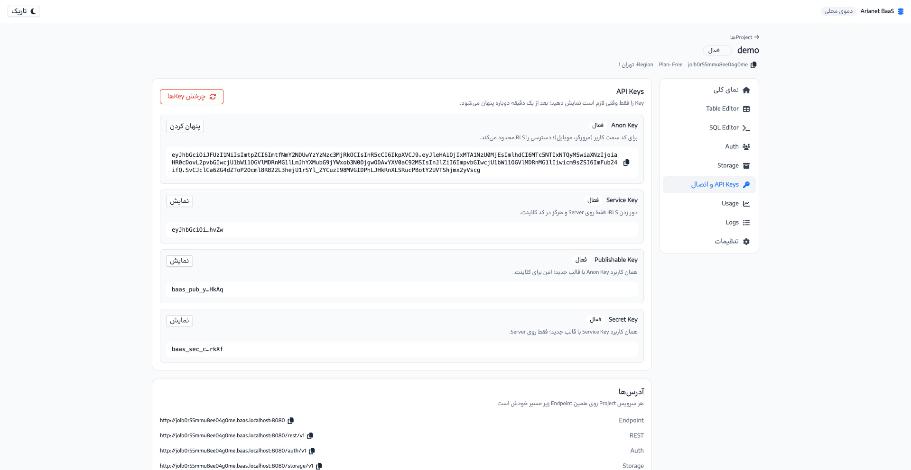
Key types
| Key | Format | Role | Where to use it |
|---|---|---|---|
| Anon Key | JWT (eyJ…) | anon | Client-side code (browser, mobile). RLS and Policies limit what it can reach. |
| Publishable Key | baas_pub_… | anon | Same use as the Anon Key in the newer format; safe for clients. |
| Service Key | JWT (eyJ…) | service_role | Servers only. It bypasses RLS and has full access to all data, files and User management. |
| Secret Key | baas_sec_… | service_role | Same use as the Service Key in the newer format; servers only. |
Send the key in the apikey header (or in Authorization: Bearer). When a User is signed in, apikey stays the Anon/Publishable Key and the User's own token goes in Authorization: Bearer (REST API: headers).
Anyone who has these keys can read, change and delete all data without any limit. Keep them only in server environment variables or CI secrets, and never commit them to a repository. Security and best practices
Reveal a key
Keys are hidden and only their first characters are shown. Show («نمایش») displays the full key and hides it again after one minute. Every reveal is recorded in your account's activity log, and reveals per Project are rate-limited. Revealing a key needs the baas:keys:manage permission.
Rotate keys
Rotate keys («چرخش Keyها») replaces the Project's signing key and its Anon and Service Keys. Use it after a possible key leak, when team members change, or on a regular security schedule. Its three steps:
- What happens? («چه اتفاقی میافتد؟»)
- A new signing key and new Anon and Service Keys are created.
- The current keys keep working for 72 hours (state "retiring") and are then revoked.
- Update your apps with the new keys within that window; after it, the old keys get an access error.
- Users are not signed out and no data changes.
- Prepare («آمادهسازی»): list where you will replace the keys: web and mobile apps, your servers, CI secrets.
- Confirm («تأیید نهایی»): rotation cannot be undone.
Notes:
- User tokens signed with the previous key are accepted until the overlap ends, and are re-issued with the new key on refresh, so users do not have to sign in again.
- Rotating again during an overlap revokes the previous "retiring" keys at once.
- Rotation does not change the Publishable Key or the Secret Key.
- You get a panel notice after a rotation.
Addresses
Every part of the Project is on one Endpoint, each under its own path:
| Part | Address |
|---|---|
| Endpoint | https://<ref>.baas.arianet.app |
| REST | https://<ref>.baas.arianet.app/rest/v1 |
| Auth | https://<ref>.baas.arianet.app/auth/v1 |
| Storage | https://<ref>.baas.arianet.app/storage/v1 |
Most client libraries only need the Endpoint and build the paths themselves.
Connection code samples
The Connection code samples («نمونهکد اتصال») card has ready code for JavaScript / TypeScript, Flutter / Dart, Swift, Kotlin, Python, curl and a .env file. If you revealed the Anon Key above, it is filled into the code; otherwise <ANON_KEY> appears in its place. The card also shows the client library package name for each language.
JavaScript sample:
import { createClient } from '<client-package>'

const client = createClient('https://<ref>.baas.arianet.app', '<ANON_KEY>')

const { data, error } = await client.from('todos').select('*')
.env sample:
ARIANET_BAAS_URL=https://<ref>.baas.arianet.app
ARIANET_BAAS_ANON_KEY=<ANON_KEY>
arianet baas env prints the same variables (CLI).
Direct Database connection
For SQL tools (such as psql or graphical clients), migration tools and ORMs, the Direct Database connection («اتصال مستقیم به Database») card gives the host, port, database name, user name, sslmode and a connection string. Show Database password («نمایش رمز Database») puts the password in the connection string (this reveal is recorded too).
psql "postgres://postgres.<ref>:<password>@<ref>.db.baas.arianet.app:5432/postgres?sslmode=require"
This connection has the Database owner's access and goes through a pooler in transaction mode. The limits of transaction mode, SSL enforcement, network restrictions and password changes are in Direct connections and Database Settings. For backups, use Backup and restore.