Edge Functions
Edge Functions run your TypeScript or JavaScript code on the server, for work that must not live in client-side code: receiving webhooks, calling another service's API with a secret key, processing before writing to the database, or proxying an AI service. Every function has an address:
https://<ref>.baas.arianet.app/functions/v1/<name>
It is called with any method (GET, POST, …) and sub-path (/functions/v1/<name>/a/b) and works with the client libraries' functions.invoke:
const { data, error } = await client.functions.invoke('hello-world', { body: { name: 'Ali' } })
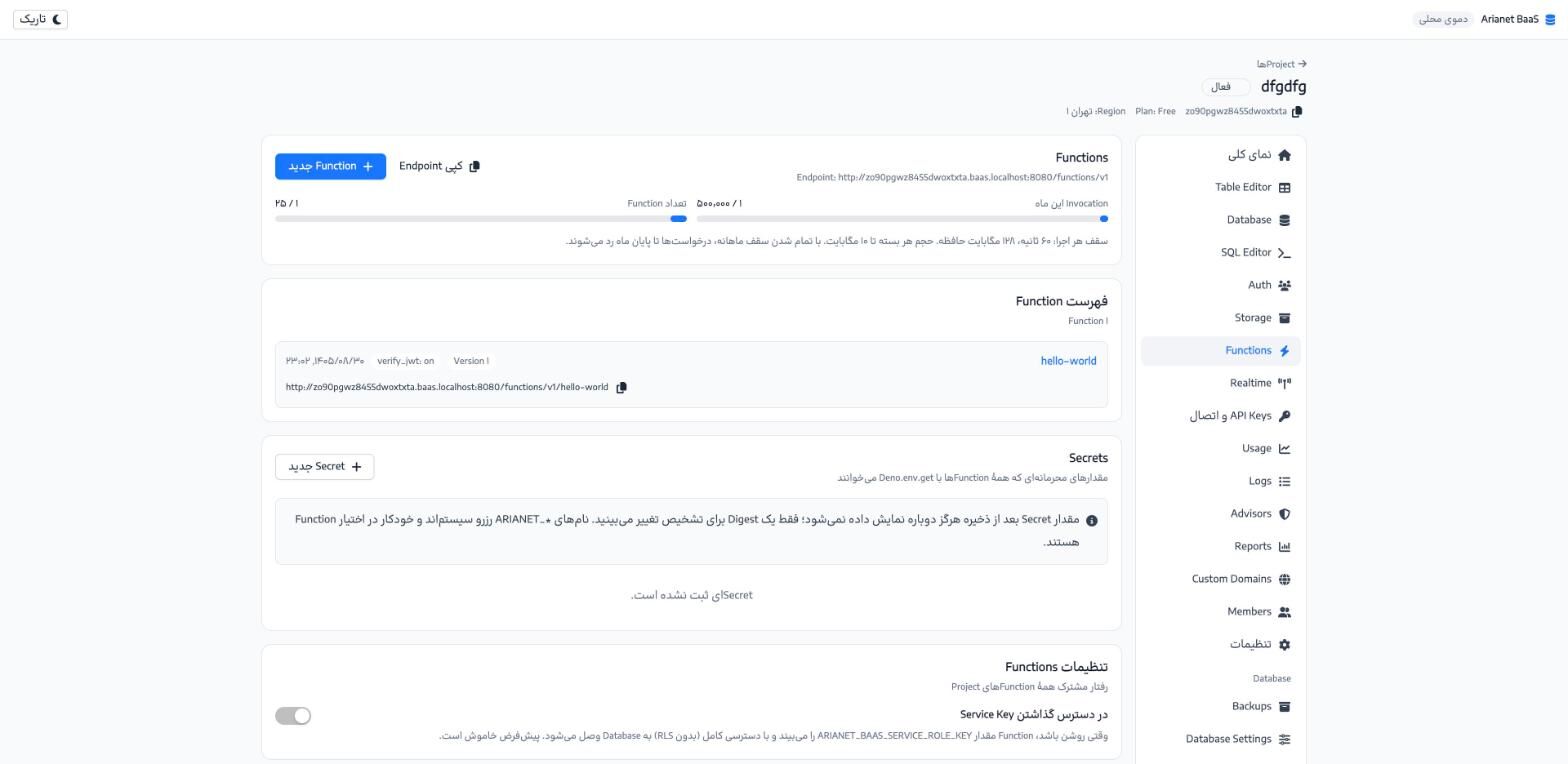
The top of the Functions page shows the endpoint, the number of functions and this month's invocations against the Plan's limits; below are the function list, secrets and settings.
Creating a function
New function is a three-step wizard:
- Choose a template:
- Hello world: takes JSON and returns a greeting; for getting started.
- Database query: connects to this Project's database with the client library and passes the request's Authorization on, so RLS applies.
- Webhook signature verify: checks the HMAC-SHA256 signature of the raw body (verify_jwt off, secret
WEBHOOK_SECRET). - AI API proxy: forwards a chat request to a compatible endpoint and streams the answer; the API key stays in a secret.
- Name and access: the name (lowercase letters, digits and
-) forms the function's address. See verify_jwt below. - Review and deploy: check the code and address and deploy. The function is ready a few seconds later.
Writing code
Register the handler with Deno.serve; it takes a standard web Request and returns a Response:
Deno.serve(async (req) => {
  const { name } = await req.json().catch(() => ({ name: 'world' }))
  return Response.json({ message: `Hello ${name}!` })
})
- Import packages with the
npm:,jsr:andhttps:prefixes (such asimport { Hono } from 'npm:hono'). req.urlsees the path as/<name>/<sub/path>, so routers such as Hono work withbasePath('/<name>').- Responses are streamed (Server-Sent Events work too).
console.log/console.erroroutput is stored in the Logs tab.- A function can reach other internet services but not internal or private addresses; writing to disk and running processes are not allowed either.
Environment variables
Available with Deno.env.get:
| Variable | Value |
|---|---|
ARIANET_BAAS_URL | The Project's address (https://<ref>.baas.arianet.app) |
ARIANET_BAAS_ANON_KEY | The Anon Key |
ARIANET_BAAS_DB_URL | The direct database connection string (owner privileges) |
ARIANET_BAAS_SERVICE_ROLE_KEY | The Service Key; only when "Expose the Service Key" is on in settings |
| Your secrets | Every secret you defined under Secrets |
CORS
The platform answers the browser's preflight (OPTIONS) for every origin itself and adds Access-Control-Allow-Origin to every response; your function needs no CORS code. Code ported from elsewhere that sets its own CORS headers keeps working.
verify_jwt
On by default: only requests with a valid Authorization: Bearer <JWT> header of this Project are accepted: the Anon Key, the Service Key or a signed-in user's token. Without it the answer is 401.
For a function that an outside service calls without a JWT (such as a payment gateway's webhook), turn verify_jwt off and check the request yourself (for example with a signature). With it off, anyone who knows the address can call the function and use up your invocation quota.
A function's page
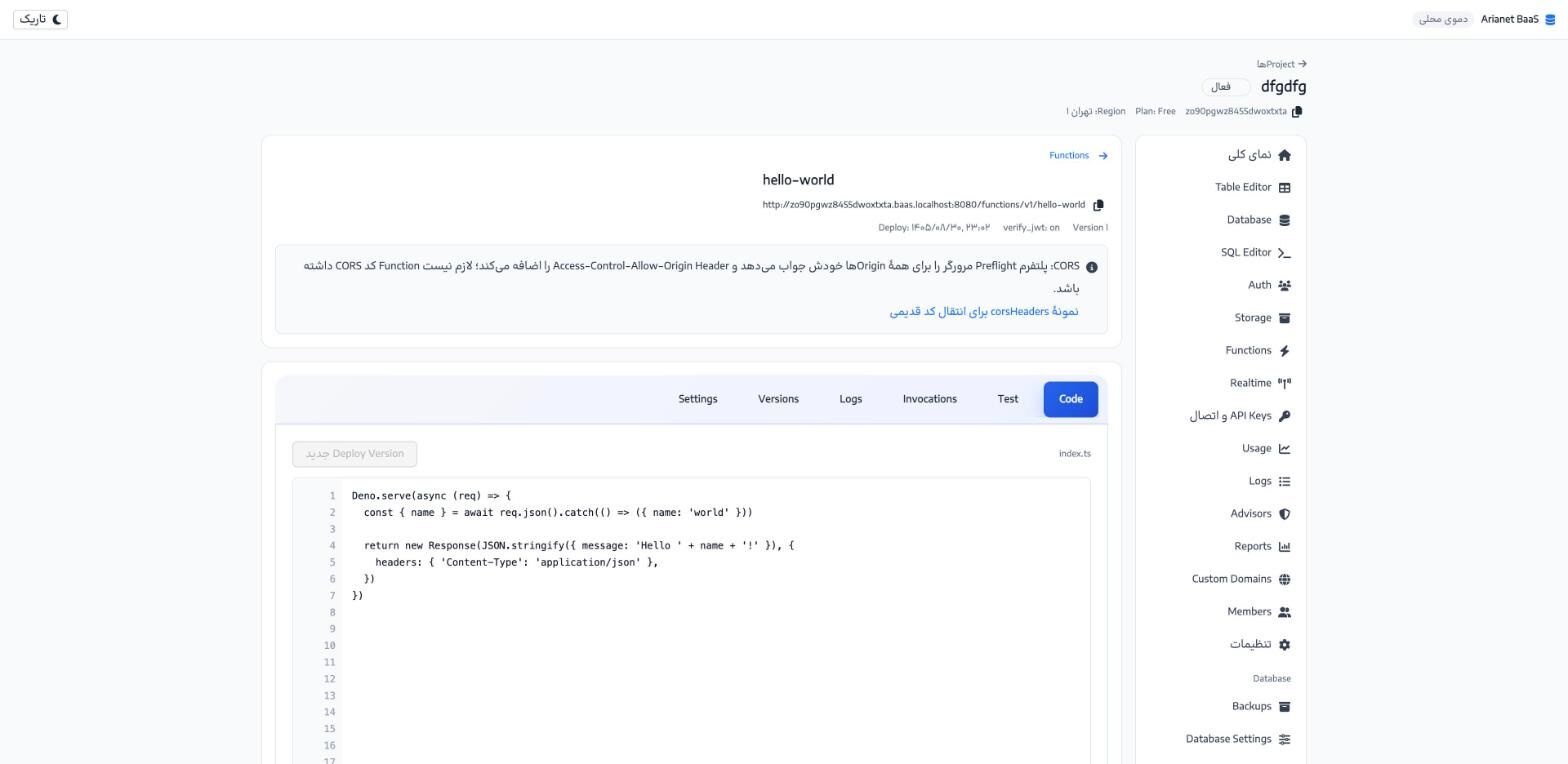
| Tab | What it does |
|---|---|
| Code | Editor for the function's files; Deploy new version publishes the changes |
| Test | A test call with method, sub-path, headers and body, as anon, service_role or without Authorization; shows the status, headers, body and duration of the response |
| Invocations | Charts of calls, errors and response time |
| Logs | Invocations and code output of the last 7 days, with filters |
| Versions | The deployed versions; roll back by activating an earlier version |
| Settings | Turn verify_jwt on or off and delete the function |
A deploy does not interrupt a running function: the next call runs the new version.
Secrets
A secret is a confidential value every function of the Project reads with Deno.env.get('NAME') (such as STRIPE_KEY).
- Secrets are write-only: after saving, the value is never shown again; you see only a digest to tell when it changed.
- Names starting with
ARIANET_are reserved for the system. - A changed secret applies from the next call; no redeploy is needed.
Settings
Expose the Service Key: when on, functions see ARIANET_BAAS_SERVICE_ROLE_KEY and connect to the database with full access (no RLS). Off by default; turn it on only when you need it.
Limits
The number of functions, bundle size, monthly invocations, maximum run time per call and memory are set by the Plan; the current values are shown at the top of the Functions page. On the Free Plan, once the monthly quota is used up, calls are refused until the end of the month. A call that runs past its time limit is stopped with 504.
With the CLI
These commands ship in the CLI release after v0.7.0.
arianet baas functions new hello-world              # arianet/functions/hello-world/index.ts from a template
arianet baas functions serve hello-world            # run locally with Deno, reloading on every change
arianet baas functions deploy <project-id> hello-world
arianet baas functions deploy <project-id>          # every function folder
arianet baas functions deploy <project-id> webhook-receiver --no-verify-jwt
arianet baas functions list <project-id>
arianet baas functions download <project-id> hello-world
arianet baas functions secrets set <project-id> STRIPE_KEY=<value> [--env-file .env]
arianet baas functions secrets list <project-id>
arianet baas functions delete <project-id> hello-world
serve needs Deno installed on your machine. With arianet baas link you can leave out <project-id>.