Realtime
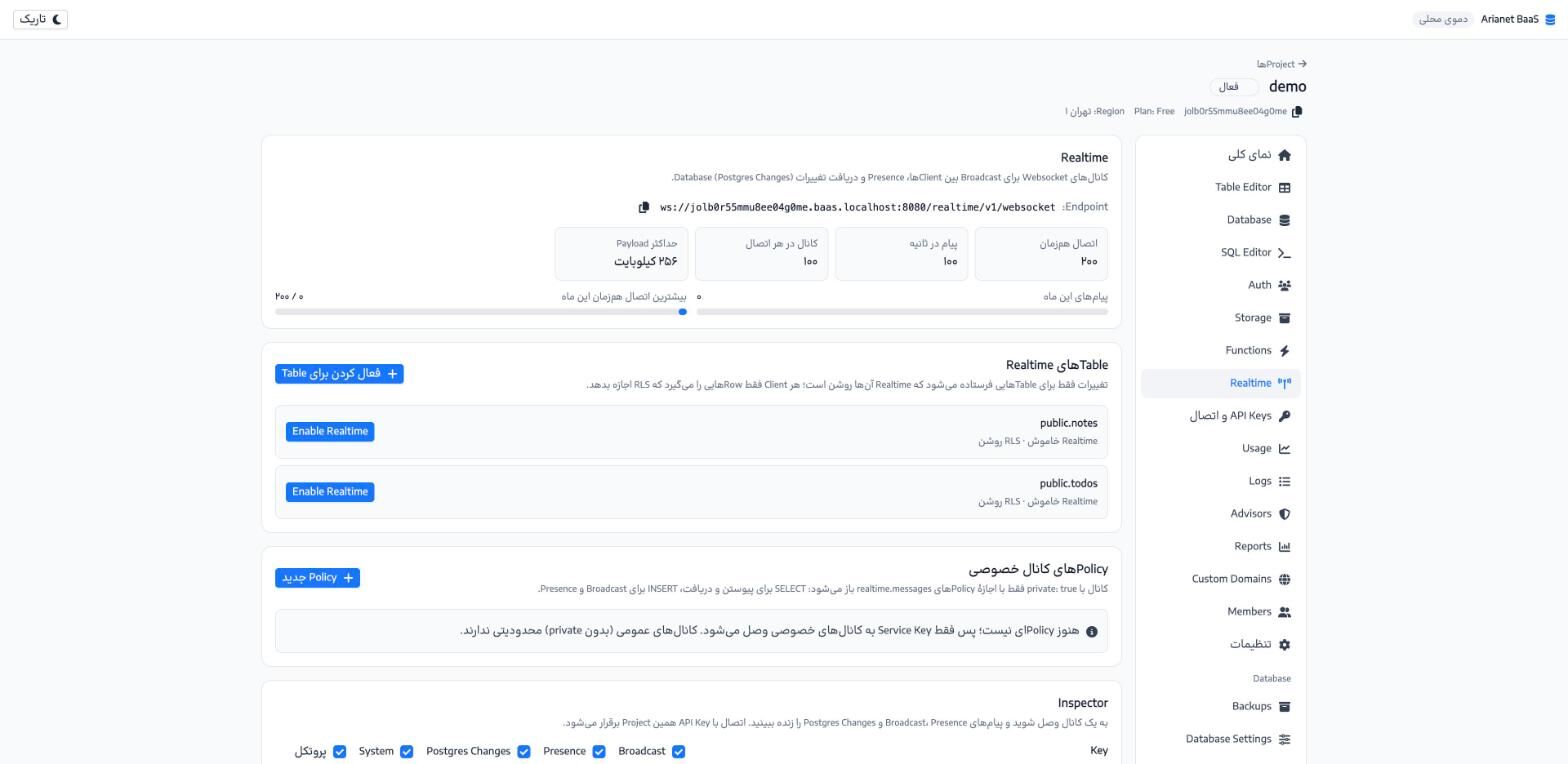
Realtime provides Websocket channels for live apps: chat, notifications, collaborative editing, showing who is online, or updating a page when data changes in the database. Its endpoint:
wss://<ref>.baas.arianet.app/realtime/v1/websocket
The protocol is compatible with the Realtime module of the client libraries; create the client with the Project's address and Anon Key. Each channel has three features:
| Feature | What it does |
|---|---|
| Broadcast | Sends a message from one client to the other clients of the same channel, also from REST or from the database |
| Presence | Who is in the channel right now (for example "online") |
| Postgres Changes | Receives a table's INSERT, UPDATE and DELETE, only the rows RLS allows |
Broadcast
const room = client.channel('room-1', { config: { broadcast: { self: false, ack: true } } })

room.on('broadcast', { event: 'message' }, ({ payload }) => console.log(payload))
room.subscribe((status) => {
  if (status === 'SUBSCRIBED') {
    room.send({ type: 'broadcast', event: 'message', payload: { text: 'hello' } })
  }
})
self: truealso returns the message to its sender;ack: truegets a confirmation for every send.- From a server over REST:
POST /realtime/v1/api/broadcastwith the body{"messages": [{"topic": "room-1", "event": "message", "payload": {...}}]}(1 to 100 messages). - From the database: in SQL or a trigger:
select realtime.broadcast('room-1', 'message', '{"text": "hi"}'::jsonb, false);  -- topic, event, payload, private
select realtime.send('{"text": "hi"}'::jsonb, 'message', 'room-1', false);       -- payload, event, topic, private
realtime.broadcast_changes(...) sends a row change as a broadcast from inside a trigger. For tables with many subscribers of different identities, broadcasting from the database is lighter than Postgres Changes.
Presence
const room = client.channel('room-1', { config: { presence: { key: userId } } })

room.on('presence', { event: 'sync' }, () => console.log(room.presenceState()))
room.subscribe(async (status) => {
  if (status === 'SUBSCRIBED') await room.track({ online_at: new Date().toISOString() })
})
track records your presence and untrack removes it. A client that joins gets the full state, then only the changes (joins and leaves). When a client's connection drops, its presence is removed automatically.
Postgres Changes
client
  .channel('todos-changes')
  .on('postgres_changes', { event: '*', schema: 'public', table: 'todos', filter: 'user_id=eq.' + userId },
      (change) => console.log(change.eventType, change.new, change.old))
  .subscribe()
event:INSERT,UPDATE,DELETEor*. Withouttable, every enabled table of the schema.filter:column=op.valuewith the operatorseq,neq,lt,lte,gt,gteandin(such asstatus=in.(open,closed)).- The table must have Realtime enabled (see below). Otherwise the channel gets a system error message.
- RLS per client: each client receives changes only for rows the table's
SELECTpolicies let it see. ADELETEreaches everyone allowed to read the table, but with RLS on,oldholds only the primary key. - Delivery is "at most once": changes made while a client is disconnected are not resent; after reconnecting, read the data once from the API.
Enabling Realtime for a table
On the Realtime page, in Realtime tables, click Enable Realtime next to the table, or Enable for a table. The wizard has three steps: choose the table, Previous row (by default UPDATE and DELETE send only the primary key of the previous row; turn this on if you need the old value of every column), and SQL review. You can do the same in a migration:
alter publication baas_realtime add table public.todos;
If a table's RLS is off, every client with the Anon Key receives all of its changes. Turn RLS on and write policies before enabling Realtime.
Private channels
A public channel is open to every client with the Anon Key. A channel joined with private: true opens only if the policies on the realtime.messages table allow it:
const room = client.channel('room-' + userId, { config: { private: true } })
| Action | Policy needed on realtime.messages |
|---|---|
| Joining and receiving broadcasts | SELECT |
| Sending broadcasts | INSERT with extension = 'broadcast' |
| Tracking presence | INSERT with extension = 'presence' |
| Seeing others' presence | SELECT |
In a policy, realtime.topic() is the name of the channel being checked:
create policy "own room read" on realtime.messages for select to authenticated
  using (realtime.topic() = 'room-' || auth.uid()::text);
create policy "own room write" on realtime.messages for insert to authenticated
  with check (realtime.topic() = 'room-' || auth.uid()::text and extension = 'broadcast');
New policy on the Realtime page offers these templates: a personal channel per user, all signed-in users read, all signed-in users send, and channels with a prefix (such as room:). Until you write a policy, only the Service Key can join private channels.
When the user's token changes, the client library sends the new token to the channels; an expired token closes the channel.
Inspector
With the Inspector at the bottom of the Realtime page, join a channel and watch Broadcast, Presence, Postgres Changes and system messages live. It connects with an API key of this Project (Anon or Service Key) and is handy for testing policies.
Limits and usage
The top of the Realtime page shows the Plan's limits (concurrent connections, messages per second, channels per connection, maximum payload size) and this month's usage (messages and peak concurrent connections). A connection or message over a limit is refused with a system message.