Logs
The Logs page shows the Project's requests of the last 7 days, to find errors and see how your app behaves.
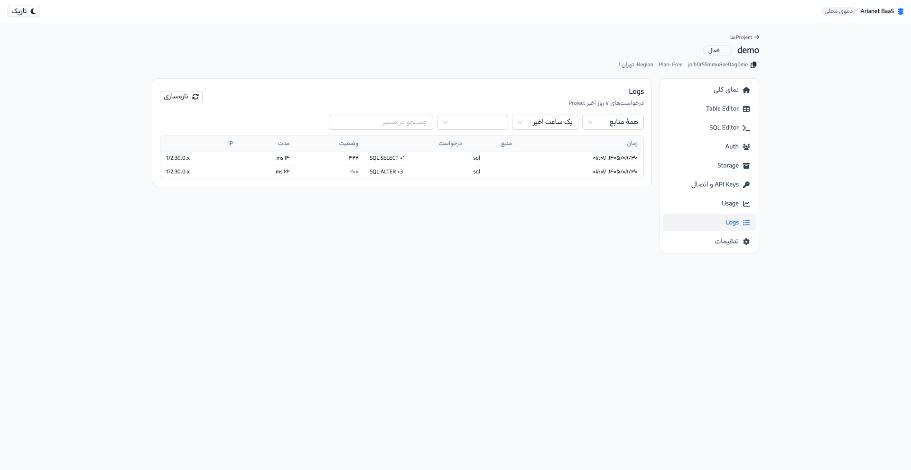
Columns
| Column | Meaning |
|---|---|
| Time («زمان») | When the request arrived |
| Source («منبع») | The part that answered: Gateway, REST, Auth, Storage, SQL (SQL Editor runs) and others |
| Level («سطح») | error (5xx or failed SQL), warning (4xx) or info |
| Method and Path («مسیر») | HTTP method and path |
| Status («وضعیت») | HTTP status code |
| Duration («مدت») | Response time in milliseconds |
| IP | The client's address, with the last part masked (such as 185.126.7.x) |
Clicking a log opens its details: Request ID, key role (anon, authenticated, service_role) and browser, besides the columns above.
Filters
- Source: all sources or one source.
- Level: all,
error,warningorinfo. - Status: all,
2xxsuccess,3xx,4xxclient error,5xxserver error. - Method: such as
GETorPOST. - Range: last hour, 6 hours, 24 hours, 7 days or a custom range.
- Search: part of a path, or a full Request ID to find one exact request.
Refresh («تازهسازی») reloads the list and Show older («نمایش قدیمیتر») loads the next page. Logs appear a few seconds after the request.
Saved queries
Keep filter combinations you use often (such as "5xx errors in REST") with Save query («ذخیرهٔ Query») and a short name, to apply them again with one click.
Privacy
- Paths are stored as templates: ids and numbers are replaced, and a file's path after the Bucket name is shown as
{path}. - Query strings, request bodies and headers are never stored, so no key or token is in the logs.
- Client IP addresses are masked.
From the terminal: arianet baas logs <project-id> --since 1h --status 5 (CLI).
Finding one request
Every response from the Endpoint has an X-Request-Id header. When you contact support, send that id with the time of the request.