SQL Editor
The SQL Editor runs any SQL statement on the Project's Database: create Tables, Functions and Triggers, change structure, run migrations and reports, and anything the Table Editor does not cover. Statements run with the Database owner's access, so RLS does not limit them.
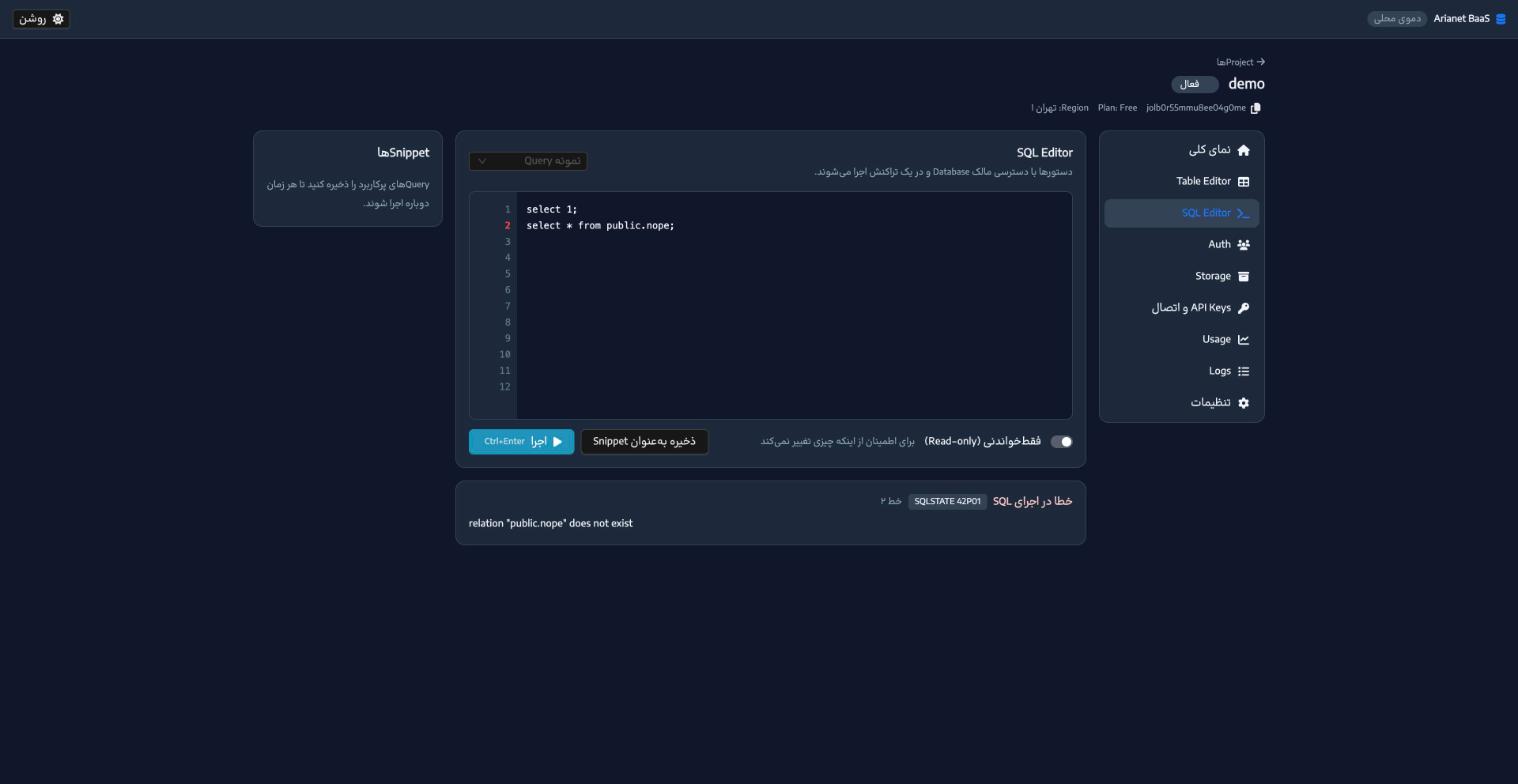
Run SQL
- Type SQL in the editor, or pick one from Sample query («نمونه Query»): list Tables, Table sizes, active Policies, create a sample Table.
- Click Run («اجرا») or press Ctrl+Enter.
How a run works:
- All statements run in one transaction: they are applied together or not at all. Do not write
BEGINorCOMMITin the text; they are refused. - The result of the last statement that returns Rows is shown in Result («نتیجه»), with the run time in milliseconds. At most 1000 Rows (and 5 MB) are shown; beyond that a note says only the first Rows are shown, and you should narrow the query.
- Each run has at most 15 seconds and is then cancelled.
- A statement that returns no Rows ends with "ran without error".
Read-only mode
Turn on Read-only («فقطخواندنی») to make sure the query changes nothing. The transaction is then read-only and any INSERT, UPDATE, DELETE or structural change fails. Use it for reports on live data.
Errors
If a statement fails, the SQL error («خطا در اجرای SQL») box shows:
- the Database's error message and its SQLSTATE code (for example
42P01the Table does not exist,42501permission denied,23505duplicate value in a unique column); - the line of the error, highlighted red in the editor;
- with several statements, the number of the statement that failed. Since they all run in one transaction, the earlier statements are rolled back too.
Snippets
Save queries you use often to run them again any time:
- Save as Snippet («ذخیره بهعنوان Snippet»): give it a name and save. With a Snippet open you can Update («بهروزرسانی») it or Save as new («ذخیره بهعنوان جدید»).
- The Snippets («Snippetها») list sits next to the editor; click one to load its text.
- Deleting a Snippet only deletes the saved text; it does not touch the Database.
- A Project holds up to 200 Snippets. Snippets belong to the Project; team members with access to the Project see them.
Limits and activity
- Per Project, at most 30 runs a minute and 600 an hour (the SQL Editor and the Table Editor's structural changes together). Beyond that you get a rate-limit error; try again shortly.
- Every run is recorded in your account's activity log (time, Row count and run time). The SQL text is never stored.
- Running SQL needs the
baas:sql:executepermission (Security).
To apply migration files in order and keep them in Git, use arianet baas db push. SQL tools such as psql also work over the direct Database connection.